By default, DIVI sets the requested email address as the “Reply-To” address. The “Reply-To” address is the email address to which a message is sent when you click “Reply” in your email client.
In itself, this is quite practical; as a website operator, you receive an email and can click “Reply” directly to write back to the person. However, what is supposedly practical is something some mail servers do not like. It is unusual for the sender to have a completely different reply address than the “Reply-To.” Spammers use this, for example, by faking a known sender and having you send the reply to a different address via the “Reply-To.”
Unfortunately, the DIVI module offers no setting to change the “Reply-To” field. Therefore, it must be solved differently; we use a filter. The code is simply added to the functions.php.
function my_custom_headers($headers, $contact_name, $contact_email){

  $my_headers = array();
  $header_reply_to_found = false;
  $http_host = str_replace("www.", "", $_SERVER["HTTP_HOST"]);

  for( $i = 0 ; $i < sizeof($headers) ; $i++ ){

    if( preg_match("/Reply-To/", $headers[$i]) > 0 ){

      $my_headers[] = "Reply-To: info@" . $http_host;
      $header_reply_to_found = true;
    }else{

    $my_headers[] = $headers[$i];
    }
  }

  if( ! $header_reply_to_found ){

    $my_headers[] = "Reply-To: info@" . $http_host;
  }

  return $my_headers;
}

add_filter( 'et_contact_page_headers', 'my_custom_headers', 999, 3 );
In this example, the Reply-To address is set to info@ of the website domain.
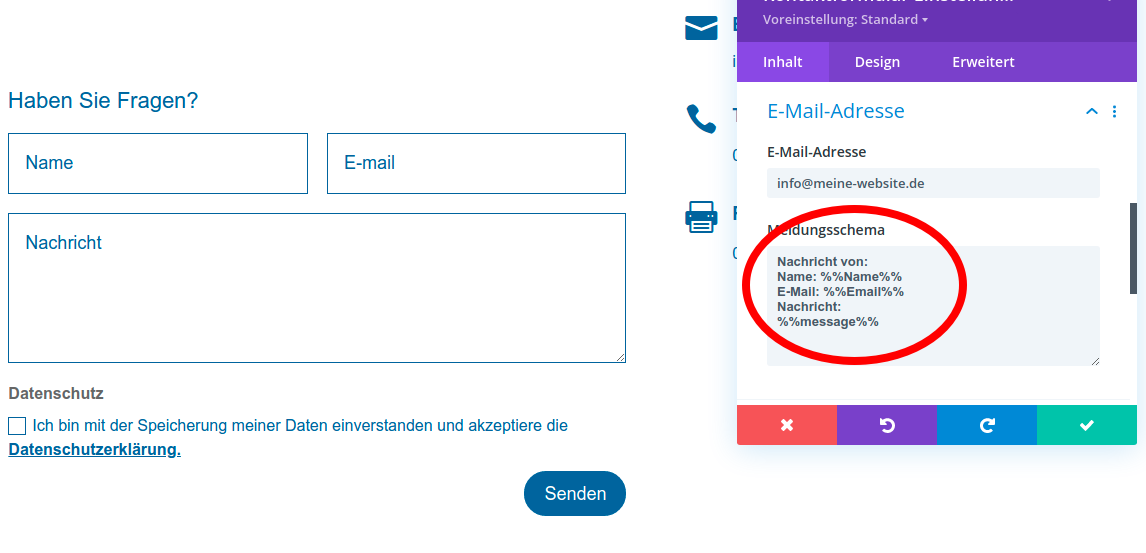
Please note: By default, the contact form only sends the content of the message field. If the email address from the form is no longer used as the “Reply-To,” you will no longer know who wrote to you. Therefore, you must include that information. This can be done via the “Email Address” > “Message Pattern” setting, as shown here in the screenshot.
Do you need help with your WordPress site? We keep WordPress up to date and secure and help when things get stuck. More about WordPress Support