Git is already an excellent version control system that allows distributed teams to work together very effectively.
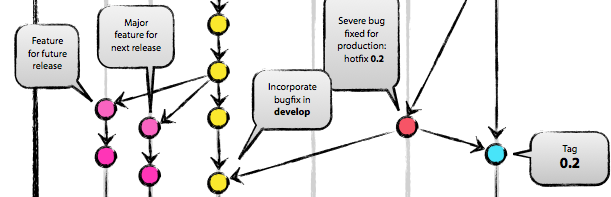
However, you can put the cherry on top by adding Git Flow, creating a truly professional environment. With Git Flow, various branches can be created automatically and merged again using predefined rules.
Here is how it works (if Git is already installed):
– Install Git Flow
– Open Git Bash and navigate to the repo
Enable Git Flow for a repo:
git flow init
To switch from one branch to another, simply use:
git checkout [branch-name]
Examples:
- Start hotfix branch:
git flow hotfix start [hotfix-branch-name] - Finish hotfix branch:
git flow hotfix finish [hotfix-branch-name]
Hotfix branches are automatically merged with the master and staging/developer branches. The feature branch is merged with the staging/developer branch. To subsequently go live, you must go through the release branch, which is then merged with the master branch.