Tutorial

WordPress: Multilingual Websites Made Easy with WPML

7 minute read

This post is from June 2017. The screenshots show the interface as it was then; today it looks slightly different in places.

It is not uncommon for websites to be offered in different languages. What seems simple and self-evident is actually more complicated, especially if you do not use the right tools.

What needs to be considered regarding multilinguality?

  • Do I want a 1:1 translation, meaning every single page is also translated into another language?
  • Should the other languages have their own URLs for equivalent content? Should different languages perhaps even use their own domains?
  • Do I need a language switcher? Does it lead directly to the corresponding page in the other language or always to the homepage of the selected language? Is there an automatic language selection based on the language set in the visitor’s browser?
  • Is there a search field? Should only search results for the current language be displayed?
  • Is the source code marked for search engines according to the language?
  • Should different teams edit the various languages?

WordPress and Multilang

First of all, you should know that WordPress does not support multilinguality natively—at least not directly. This has not changed to this day (as of 2026): multilinguality in the core has been announced as the final phase of the Gutenberg project, but has not yet been implemented.
Using the detour of Multisite Mode (Network), more or less independent sub-sites can be created, which can be used to map language variants. More on that later.
WordPress only becomes a multilang CMS through plugins: to name a few (well-known) ones: WPML (paid, annual license), Polylang (freemium), TranslatePress (freemium), or MultilingualPress (paid, only works with Multisite).

Multilang Done Right

Theoretically, a multilingual website could also be realized without plugins—with some programming effort: the language variants are created as main pages, e.g., de and fr, the respective pages of the language variants are created below them, and the content is written in the respective language. However, so that a German menu appears for the selection /de and a French one for /fr, different templates must be used for the different page trees (or installing a switch is sufficient). The different templates make it possible to provide the source code with HTML language indicators (which you cannot otherwise reach with WordPress tools) or to display language-specific menus. You don’t need to worry about widget areas separately in the template; these can be solved in the backend, e.g., with plugins such as Content Aware Sidebars. It gets a bit more complicated with the language switcher, or the logical connection of identical pages as language variants. And even more complicated if you want to run a shop, e.g., with WooCommerce.
Let’s leave it at this example; it is easy to see that it is time-consuming and also requires relevant knowledge of WordPress theme programming. There is a much easier way.

Multilang with WordPress Multisite

As already described, you can also create a multilingual website with native WordPress tools. First, you have to install WordPress in the Multisite variant. This is not difficult, but very few 1-click installers are likely to allow this, so manual work is required.
Once set up, the peculiarities of this operating mode begin: there is a Super Admin. The Super Admin is the only one allowed to create further sub-sites and install themes and plugins. The “normal admins” are each responsible for their assigned sub-site, but they cannot install themes or plugins as in normal WordPress mode. They can only activate or deactivate those from the selection installed by the Super Admin. It is important to know at this point that not all plugins are Multisite-compatible.
The Super Admin creates, for example, 2 sub-sites, one “de”, one “fr”, and defines 2 teams that he assigns to the 2 sub-sites. They can be the same users who can access both sub-sites, or separate ones. Exactly this possible separation is a feature that certain website operators do not want to miss: separate teams for separate language variants. It is clear that such a feature is more interesting for larger companies or for those with strictly regulated workflows.
This separation of sub-sites has the advantage of being able to create completely separate websites, but at the same time carries the risk that two sub-sites (language variants) will also separate visually over time—which very few people would want.
To logically connect identical pages of the different sub-sites, there are (once again) plugins, such as Multisite Language Switcher.

Multilang with WPML

WPML LogoSo, now we come to the actual topic of the article: WPML (WPML = WordPress MultiLingual). I will not explain all the features of the plugin, only the essential ones. Unlike Multisite mode, you can also breathe multilinguality into the website afterwards with WPML, so the precautions do not have to be planned long in advance (strictly speaking, you can also convert a normal website into Multisite afterwards or import it into a sub-site, but that is quite complicated and error-prone).
WPML consists of several components, of which you do not necessarily need all. The central unit is the WPML Multilingual CMS; in most cases, the “WPML String Translation” component is installed as well. (As of 2026: “WPML Translation Management” has been included in the main plugin since WPML 4.5, “WPML Sticky Links” is no longer needed because WPML adjusts internal links itself during translation, and “WPML CMS Nav” is only needed by a few websites. String Translation is only available starting from the “Multilingual CMS” license.)
WPML Basic Settings

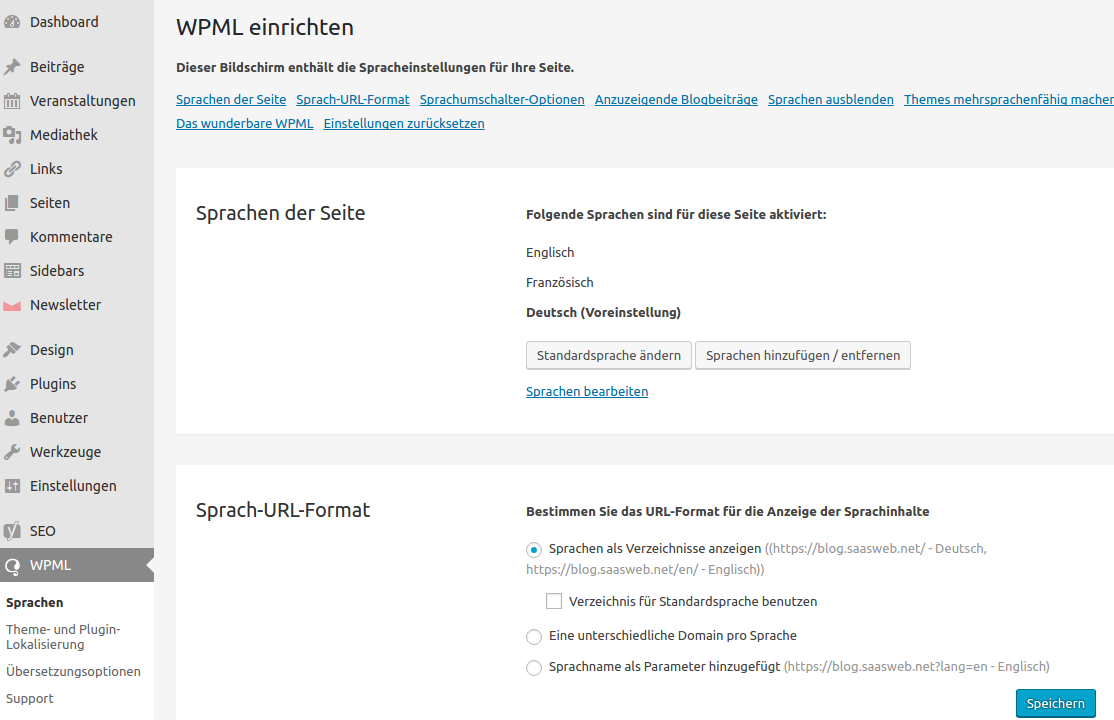
Once installed, you define the additional languages to be created in a setup wizard and can configure various points such as:

  • Defining the default language
  • Whether language variants should be displayed as subdirectories (“/de”, “/fr”), with a separate domain per language, or as URL GET parameters (“?lang=de”, “?lang=fr”)
  • Language switcher options, e.g., handling content that only exists in one language, switcher as a dropdown field or with flags or the language written out, …
  • Setting up automatic language redirection based on the visitor’s set browser language

Duplicating Pages with WPML for Translation

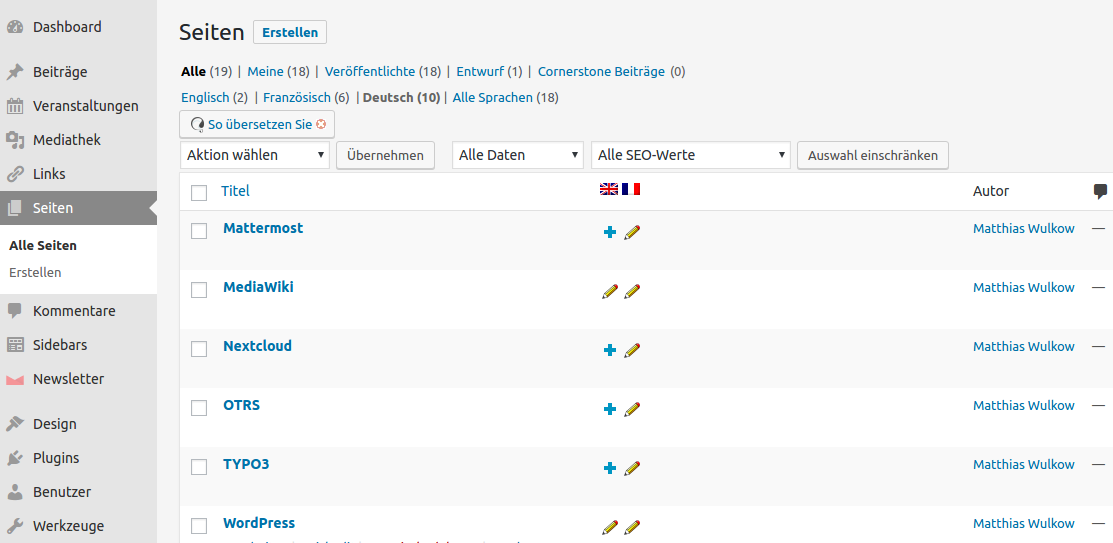
Once you are finished with the basic settings, you can start translating: the individual pages and blog articles can be duplicated into the desired language in the overview list with a mouse click (with or without copying the content). An interesting feature here is editing the translation alone or linking it to the original. In the latter case, you will be notified of changes in the original when viewing the translation.
As of 2026: Today, translation is mostly done via the plus symbols in the page list or the translation dashboard (WPML > Translation Management) in the Advanced Translation Editor. Upon request, WPML also translates the content automatically via AI; the larger licenses include a word quota for this.

Language-Dependent Menus

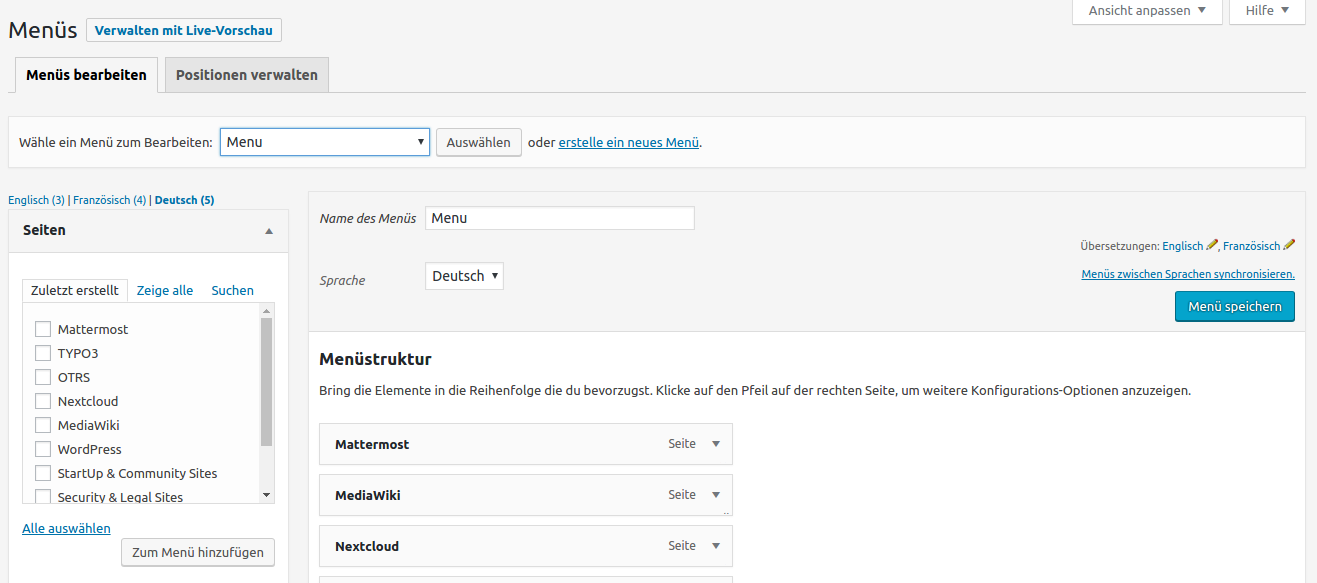
Not only the pages need to be translated. The menus should also be automatically assigned to the selected language. This is very easy with WPML. Either you use the synchronization function (menu item “WPML > Synchronize WP Menus”) or you create a new navigation, select the language, and define whose language alternative it is. If your website uses a block theme, you translate the navigation in the translation dashboard instead.

Many Other Features

I won’t go into depth, but WPML has modules for optimized localization of:

  • Gravity Forms (a paid plugin for creating forms)
  • Various Page Builders: Page builders are plugins that replace the visual editor of WordPress; they allow for the easy setup of complex layouts in the content area. Well-known page builders include the free SiteOrigin Page Builder or the paid WPBakery Page Builder (formerly Visual Composer). Since WordPress 5.0, WordPress itself has included a layout builder with the Block Editor, which WPML also supports.
  • WooCommerce – the eShop extension for WordPress

Use WPML Free of Charge with the SaaS Web Premium Plan

In the Premium plan of our Managed WordPress hosting, the use of various licensed plugins is included free of charge. In addition to WPML, these include Gravity Forms, SearchWP—an improved search function—and the Pro version of the Newsletter plugin.

You can find the Managed WordPress hosting offers here.

Are you planning a new website? We develop WordPress websites that you can maintain yourself. More about WordPress websites