The Challenge: WordPress Updates
WordPress core updates typically proceed without issues. However, with plugin or theme updates, the situation is quite different. The causes can vary greatly: bugs within the plugin itself, compatibility with other plugins, and so on. The potential consequences of these errors also vary widely; in some cases, the entire homepage may no longer display, or PHP error messages might appear in the middle of the page. Often, these are minor changes, yet undesirable.
Compare Screenshots After an Update
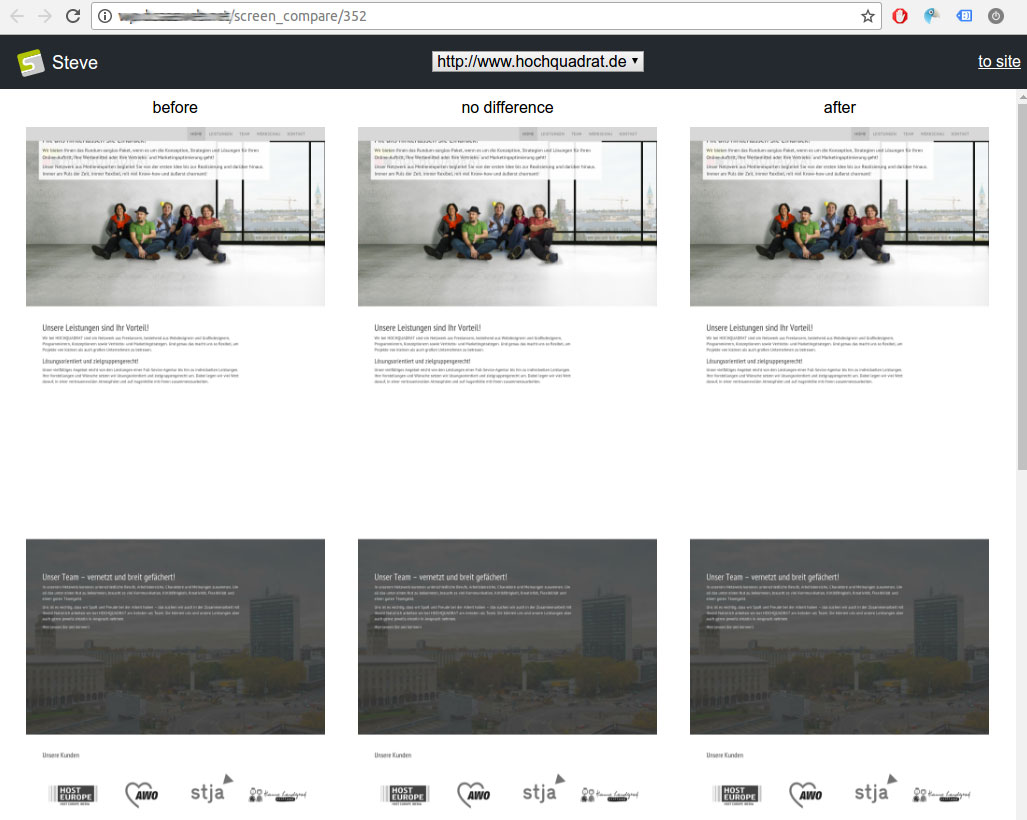
By comparing “before and after” automatic website screenshots, even minor errors can be detected. The system automatically searches for changes and indicates the number of differences found (in %).
This allows errors to be identified much later (Steve retains the update history and corresponding screenshots) and, if necessary, enables the restoration of the correct backup. By default, a backup is created with every update process, whether it’s a single update or multiple updates in quick succession.
The Future: Auto Backup Restore, Auto Plugin Tagging, and More
- Clients can receive an email with a link to the screenshot comparison after updates to verify that everything is in order.
- Clients can indicate whether the check was successful or if it contained errors; messages will then be passed to Steve to potentially revert the updates and, if necessary, tag the plugins (in their existing version) as “broken.”
- Once automated staging is integrated, this process can also be mapped to it: the update will only be deployed to the live instance after client approval.